|
|
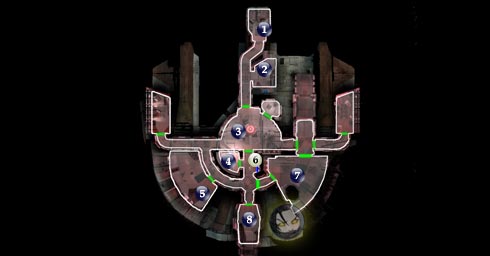 Did we miss anything on this map? Is there something we didn't discover? Let us know!
One note I'd like to stress here at the beginning, even though I've mentioned in the FAQ already: since in this game, items are not as static as they were in KotOR, it will not be possible to list many of the locations for them, as they're random in most cases. The walkthrough will attempt to give you all the locations of powerful items that are NOT random, however. In any case, search every bin, footlocker, corpse and conceivable container for free items, as you can either break them down (new in KotOR II) at a workbench or lab station for useful components, or sell the ones you won't use and get rich quick.
1 - Bridge
Did we miss anything on this map? Is there something we didn't discover? Let us know!
One note I'd like to stress here at the beginning, even though I've mentioned in the FAQ already: since in this game, items are not as static as they were in KotOR, it will not be possible to list many of the locations for them, as they're random in most cases. The walkthrough will attempt to give you all the locations of powerful items that are NOT random, however. In any case, search every bin, footlocker, corpse and conceivable container for free items, as you can either break them down (new in KotOR II) at a workbench or lab station for useful components, or sell the ones you won't use and get rich quick.
1 - Bridge
Welcome to KotOR II's tutorial. It's a brief mission that will be extremely easy for all, especially for those familiar with the first game. You begin as T3-M4, a droid, on the bridge of the damaged and drifting Ebon Hawk spaceship. To skip the tutorial, do a 180 in the bridge and activate the console, but I'd recommend going through it to get a piece of the story and a head start on the hundreds of items you'll accrue.
After you've repaired the hyperdrive:
Also in the Bridge is the Galaxy Map, the panel on the wall that you'll be able to select your destination once you finish the mission. Through the tutorial intro, you know that the hyperdrive at #8 is damaged, so when that is fixed, simply activate the Galaxy Map and choose Peragus II - the Peragus Mining Facility. Congratulations, you're done with the tutorial.
2 - Communications Room
Take T3-M4 into the room, open the container and use the computer spike to slice into the terminal there. Open the main hold door, and proceed to #3.
3 - Main Hold
Search the area for a dead body for a "locker key", a broken droid, and the footlocker against the wall. You'll learn how to bash the footlocker open. Leave the console alone in the room for now, as you'll be coming back to it shortly.
After you've been to the Outer Hull:
Take T3-M4 or 3C-FD and turn on "solo" mode by using the Back button (for Xbox users obviously). Use either droid to enter the space between the Garage at #7 and the south corridor. Use the other droid to access the console in the Main Hold, slice the computer with 2 spikes, and close the outer door. Then have the same droid open the inner door for the now-trapped droid. Switch characters (with the black button on Xbox), and read #7 below.
4 - Medical Bay
Here's where your main character is lying unconscious. Have your droid open the container near the bed and take the medpac. Use it on your main character to treat his or her injury.
5 - Cargo Hold
T3-M4, meet 3D-FD. Optionally invite 3D-FD to your party (recommended), and open the nearby metal container for a weapon. This will begin the sensor droid combat tutorial. Equip the weapon and attack the hostile (though harmless) sensor droids. Nearer the back of the hold, open the unlocked right container, take the security tunneler out, and use it on the high security container next to it. You may also open the locker in the room with the locker key you received from #3.
6 - Exit
Exit to Outer Hull (#1). Visiting the Outer Hull is required, and if you're following the walkthrough, now is a great time to go there.
7 - Garage
You've been to the Outer Hull and have read #3 above. You have one droid inside the Garage. Use it to exit through the north door and take a right into the now-open Starboard Dormitory. Take all the items including an armor plating for your droid and some more parts (not that you need them now) for the hyperdrive.
Proceed back into the garage and use the workbench. I'd suggest taking the time to learn about it while you're there, and then use it to create an item. Create a repair kit, and exit the workbench. You will no longer need this character in the tutorial (not even to join up with the other). Switch characters and take the droid who is waiting by the console down to the door to #8. Time to repair the Hyperdrive and get to Peragus.
8 - Engine Room
Use your droid to place a mine you received from the Outer Hull next to the door (just highlight the door and select the mine from the quickbar at the bottom). Back away and watch as the blast blows open the door. Enter the room and use the hyperdrive at the back. By now you should have ample parts enough for the job (only 5 are required), so use them to "rig the hyperdrive" and you're done! See #1, "after you've repaired the hyperdrive."
|
|
|



